

At a glance
BacklinkGPT vs Respona
Respona now spans managed placements, DIY outreach software, and a separate Semrush app. BacklinkGPT is one owned agent that hunts every night, drafts under your brand, and waits for your approval.
- You want an agent, not another campaign tool: it scans SERPs nightly, judges every page with a written rationale, finds the right contact, and drafts the pitch.
- You want autonomy with a safety rail: nothing sends without your approval, sends stay inside your window, and senders warm up automatically.
- You want honest capacity pricing: plans sell senders + daily pace; credits (2,000 / 6,000 / 20,000) are a fair-use meter, not a puzzle.
- You want a done-for-you model: pay per placement and outsource outreach + content.
- You are optimizing for placements by tier (DR bands) instead of building an internal outreach workflow.
- You want a choice between managed placements, operator-led DIY software, and a separate $169/month Semrush app.
TL;DR
The short version. Use the sections below if you need details.
- Respona has three current routes: pay-per-result placements, DIY outreach software, and a $169/month Semrush app. BacklinkGPT is one owned, approval-gated agent.
- If you want the pipeline to move without you running campaigns (nightly hunts, morning digest, drafts waiting for review), BacklinkGPT is built for exactly that.
- If your team wants to outsource placements entirely and is comfortable with mixed-model billing, Respona can be the right fit.
Pricing snapshot
Respona pricing, without the guesswork
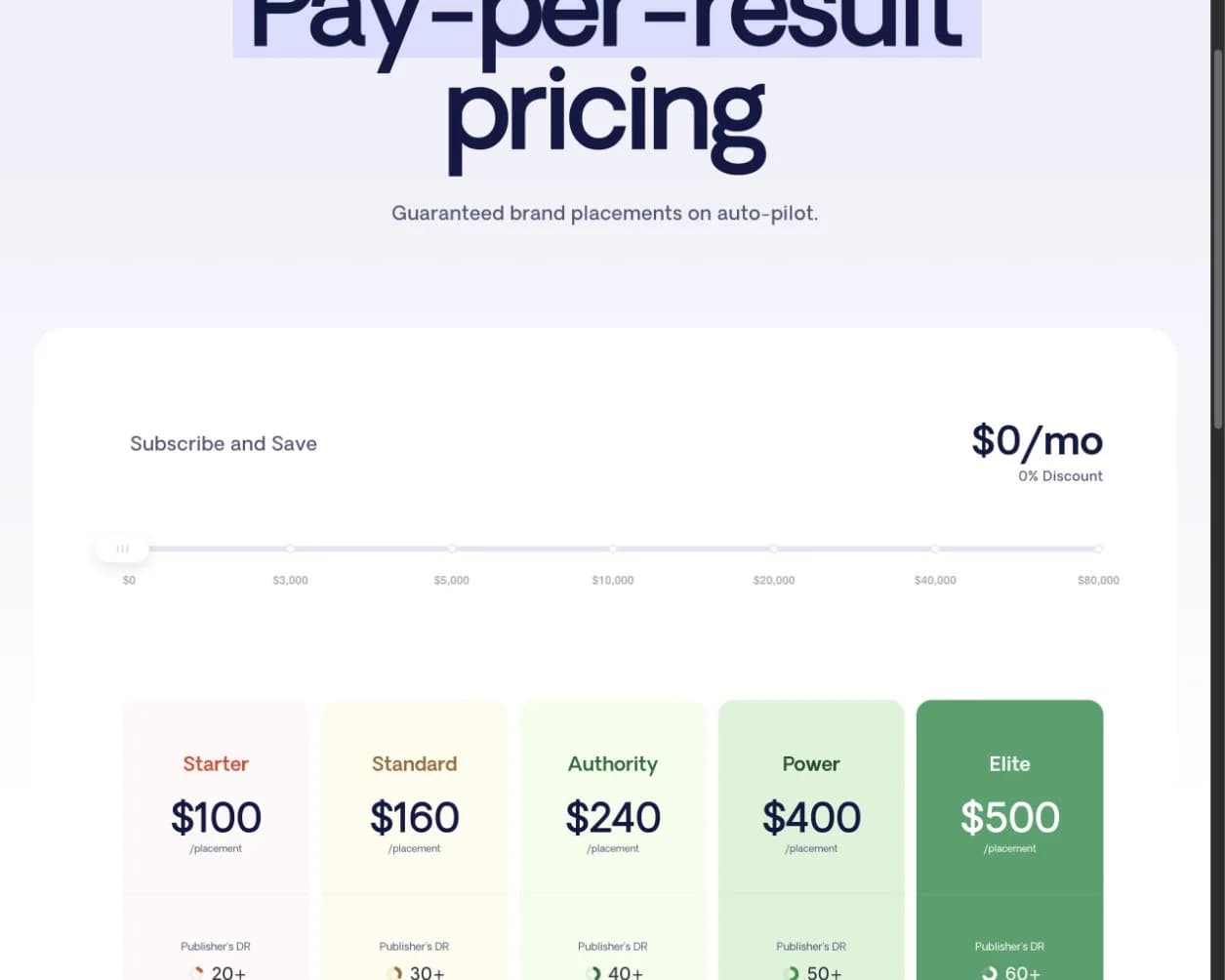
This is the public pricing page we used for the comparison. Here are the numbers worth paying attention to.
What you need to know
- Respona now leads with pay-per-result placements rather than a DIY outreach subscription.
- Published placement tiers run from $100 for DR20+ to $500 for DR60+ publishers.
- The current site describes 28-day standard delivery, with a 14-day express option.
The screenshot confirms Respona’s published packaging and price points. It does not independently verify publisher quality, ranking impact, or delivery outcomes.
See the live page
https://respona.com/pricing/View pricingPricing and billing semantics
This table covers the items most likely to change your real monthly cost. If a cell says 'Unclear', verify it in writing before committing.
Which is the better fit?
 BacklinkGPT
SELF-SERVE
Explicit cost drivers
 Respona
SERVICE + DIY TOOLS
Three product paths
What you pay for (primary driver)
The thing that actually scales your spend.
BacklinkGPT
Capacity: senders + daily agent pace (credits are fair-use fuel)Respona
Managed placements, DIY outreach software, or the $169/month Semrush appIncluded prospecting / discovery
What you get before paying extra.
BacklinkGPT
2,000 / 6,000 / 20,000 prospect credits (by plan)Respona
Placements: included; Semrush app: 10,000 monthly data creditsIncluded inboxes / sending accounts
How many mailboxes are included by default.
BacklinkGPT
1 / 3 / 6 connected senders (by plan)Respona
Semrush app: 2 email accounts; placements: Respona runs outreachOverage model
What happens when you go past included usage.
BacklinkGPT
Credits: $0.03Inbox: $19/month
Respona
Placements: buy more results; Semrush app: in-app purchases are listedRefund / guarantee
The part that affects risk if it’s not a fit.
BacklinkGPT
7-day free trialRespona
Semrush app: 7-day trial; placements: confirm delivery and replacement termsDeep feature comparison
Not “does it have X”, but “what does X actually look like day-to-day”.
Which is the better fit?
BacklinkGPTBACKLINK-FIRST
Track to live links
ResponaSERVICE + APP
Placements + campaigns
Primary outcome you track
What the tool pushes you to optimize.
BacklinkGPT
Links shipped + kept (pipeline)Respona
DFY: placements; DIY: campaign executionProspecting philosophy
How you build the target list.
BacklinkGPT
The agent judges every page (keep/drop + written rationale); keep-rates tune next huntsRespona
Semrush app: template-led campaigns; placements: targets handled for youContact discovery cost profile
The hidden budget item in many tools.
BacklinkGPT
No separate hidden burn category (credits are explicit)Respona
Semrush app: 10,000 monthly data credits and contact discoveryDeliverability safeguards
What prevents accidental high-volume sending.
BacklinkGPT
Enforced default: 30 sends/day per inboxRespona
Semrush app limits are not clearly documented on the public listingLink monitoring
What happens after a link goes live.
BacklinkGPT
Built into the core workflow (backlink-first)Respona
Campaign analytics in the Semrush app; placement terms apply to the serviceAPI
If you need to integrate into internal systems.
BacklinkGPT
Unclear (verify current product)Respona
Public API: Unclear (verify current product)Workflow: how teams use it
This is where the biggest day-to-day difference appears—not just in the feature list.
BacklinkGPT workflow
- 1
Enter your domain
The agent reads your site, picks target pages, seeds keyword angles, and judges its first prospects in minutes.
- 2
It hunts every night
Nightly SERP scans, competitor backlink mining, and contact discovery keep the pipeline stocked — on your timezone, within your plan.
- 3
You approve, it lands
Drafts wait in your review queue; approved sends go out in your send window, replies get triaged, and live links are tracked.
Respona workflow
- 1
Model selection
Choose managed placements, Respona’s DIY software, or the separate Semrush app.
- 2
Execution in service mode
Respona handles placements; DIY and Semrush app users operate their own outreach.
- 3
Cap and credit control
Budget by placement tier or by the app’s $169 subscription, 10,000 credits, and in-app purchases.
Pricing details that affect the real cost
Compare the limits, add-ons, and scaling rules—not only the starting price.
BacklinkGPT
Model
subscription = capacity (senders + daily agent pace); credits are a fair-use meter
Included
- 2,000 / 6,000 / 20,000 prospect credits (fair-use, by plan)
- 1 / 3 / 6 connected senders included
- 7-day trial — the agent shows its work before you pay
Usage & add-ons
- Extra credits: $0.03 (top-up pack or opt-in overage)
- Extra sender: $19/month
Notes
- One marginal price for credits everywhere — no overage arbitrage, no surprise bills.
- Upgrades buy real throughput: more senders and a faster daily pace, not just bigger numbers.
Respona
Model
managed placements plus separate DIY-software and Semrush-app routes
Included
- Placements from $100 at DR20+ to $500 at DR60+
- DIY software is currently offered separately, including through AppSumo
- Semrush app: 2 email accounts, 10,000 monthly data credits, and 30,000 active contacts
Usage & add-ons
- Placement volume and tier
- DIY credits
- Semrush app in-app purchases
Notes
- Choose the product path first; the service, DIY software, and Semrush app solve different operating needs.
- Verify placement replacement terms and the app’s in-purchase pricing before committing.
A practical switching plan
Move one workflow at a time, keep the outreach history you need, and test sender setup before scaling.
Steps
- 1
Define required model (DFY vs DIY)
Decide which parts can stay managed and which must remain in-house.
- 2
Align team ownership for placements
Document who owns qualification, outreach, and placement proof before switching tools.
- 3
Pilot one funnel end-to-end
Run one short campaign through both setup and monitoring to evaluate reliability and risk.
Checklist
- Current invoices and guarantee terms for DFY replacement commitments.
- In-app purchases and credit usage in the Semrush app path.
- Whether A/B testing, API access, and monitoring are required for your setup.
The question that matters most: which Respona are you evaluating?
Respona now spans more than one buying model. Its main site emphasizes a done-for-you placement service, while the company also offers DIY software and develops a separate Semrush app. Those options differ in who chooses prospects, who sends outreach, what you approve, and what the bill scales with. Decide which operating model you want before comparing feature checklists.
This distinction also changes how you should read reviews. Respona has a substantial G2 history, but much of it describes the earlier outreach software. Reviewers commonly praise the combined prospecting, contact finding, and campaign workflow; recurring cautions include the initial learning curve, credit usage, price, and the human work still required after a reply.
Who is behind Respona?
Farzad Rashidi and Payman Taei launched Respona in 2019 after incubating the workflow inside Visme. Rashidi had helped grow Visme through content and link building, then productized the outreach process. That background explains why Respona began as operator-led outreach software before expanding into managed placements.
Questions to ask before choosing
Quick answers to the points worth checking before you choose.
Sources
Last reviewed: 2026-07-23
Respona comparisons hub
https://respona.com/comparisons/Respona pricing
https://respona.com/pricing/Respona link building software
https://respona.com/link-building-software/Respona warm-up guidance (help)
https://help.respona.com/en/articles/5687915Semrush AI Backlink Builder
$169/month app developed by Respona, with two email accounts and 10,000 monthly credits.
https://www.semrush.com/apps/ai-backlink-builder/What is Respona?
Current done-for-you workflow.
https://help.respona.com/en/articles/5671067-what-is-responaRespona founder story and DIY offer
Launch history, Visme origins, and the current DIY software route.
https://appsumo.com/products/respona/Respona reviews on G2
Independent review volume and recurring buyer themes.
https://www.g2.com/products/respona/reviews


